
The Amazon Basics Air Circulator Desk Fan is the best budget desk fan for most buyers because it pairs a compact footprint with straightforward airflow at a low price. It is a practical choice for desks, bedside tables, and small work areas where a full-size fan would take too much room.
This guide is for shoppers who want personal cooling without spending much. For small fans, the key factors are physical size, airflow reach, noise, and control simplicity. A compact housing fits more spaces, but limited coverage may leave a larger room warm. Low noise matters for sleep, calls, and focused work. The six picks below are ranked with clear reasons and honest drawbacks for each, so you can match one to your desk and daily routine.
Quick Comparison
| # | Product | Best For | Price | |
|---|---|---|---|---|
| 1 | Amazon Basics Air Circulator Desk Fan | Budget-Conscious Desk Users | ~$16 | View → |
| 2 | SWEETFULL USB Desk Fan | Quiet Home Office Workers | ~$14 | View → |
| 3 | Levoit Tower Fan | Whole-Room Cooling Seekers | ~$40 | View → |
| 4 | TriPole USB Desk Fan | USB Laptop Workspace Users | ~$9 | View → |
| 5 | Coolhill USB Desk Fan | Compact Nightstand Cooling | ~$20 | View → |
| 6 | Gaiatop Portable Desk Fan | Travelers Needing Portable Air | ~$17 | View → |
6 Budget Desk Fans Worth Considering
The list is ranked by price, airflow, noise, and features, counting down to the top budget pick.
6. Gaiatop Portable Desk Fan

Best for: Small desks and bedside tables
The Gaiatop Desk Fan is a compact AC-powered air circulator for personal cooling. It measures 5.59 by 5.65 by 4.33 inches and weighs 0.73 pounds, so it takes little desk space and moves easily between rooms. Its 4.92-foot cable reaches nearby outlets, but the cord is not detachable. Four rubber feet help limit sliding and vibration on smooth surfaces.
A 360-degree tilt range lets you aim airflow upward, forward, or toward your hands. Three manual speed settings provide basic control, while the motor reaches a listed maximum wind speed of 6.2 m/s. Gaiatop rates its noise at 30 dB, which suits work areas and sleep spaces better than many larger fans. The front grille comes off for blade and grille cleaning. At 6.8 watts, it uses little electricity, though its small size makes it better for personal airflow than cooling an entire room. The price usually sits around $17 to $18.
Pros
- Small footprint: The 5.59-inch-wide body fits beside a monitor, lamp, or bed.
- Flexible airflow direction: A full 360-degree tilt range helps aim air at your face, hands, or upper body.
- Low power use: The 6.8-watt rating keeps energy consumption modest during long work sessions.
Cons
- No battery operation: The AC plug and undetachable cable limit use away from an outlet.
- Limited coverage: This 5-inch fan can improve personal airflow, but it cannot replace a full-size room fan or air conditioner.
5. Coolhill USB Desk Fan
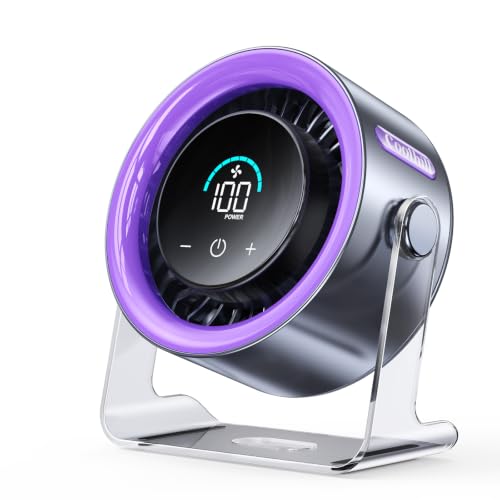
Best for: sleepers needing a compact bedside breeze
This Coolhill personal fan fits a desk, nightstand, kitchen counter, or wall-mounted setup. Its 1-to-100 speed range gives more control than the usual three-speed design. The screen shows the current setting in clear numbers, which helps when adjusting the fan in a dark bedroom. A 120-degree rotating function spreads airflow across a wider area instead of aiming in one fixed direction.
The built-in 3,000mAh battery runs for about 3 to 10 hours, then recharges through USB-C in roughly 2.5 hours. It can also run from a laptop, power bank, car charger, or other USB source. The manufacturer rates noise as low as 28dB and airflow up to 6m/s, though those figures may apply to different settings. At around $20, this small rechargeable fan offers useful flexibility for bedrooms, desks, campers, and spaces without nearby outlets.
Pros
- Fine speed control: Choose from 100 settings, with a digital display showing the selected level.
- Flexible placement: Use it on a desktop, wall, or portable setup, with 120-degree rotation.
- USB-C battery power: The 3,000mAh battery provides about 3 to 10 hours of cordless use.
Cons
- Runtime depends heavily on speed: The 3-to-10-hour range means maximum airflow will likely require more frequent charging.
- Limited room coverage: This personal fan can cool one nearby person, but it will not replace a larger floor or room fan.
4. TriPole USB Desk Fan

Best for: Small desks and bedside tables
The TriPole is a compact USB desk fan with a 4.5-inch diameter. Its small footprint fits beside a laptop, monitor, or nightstand lamp without taking much room. A button on the rear switches between three speed settings, so you can choose a lighter breeze or stronger airflow. The included 4.9-foot cord also gives you more placement freedom than many short USB cables.
Power comes through a 5V USB-A connection. You can use a computer, USB charger, power bank, or compatible travel adapter. The fan head adjusts through a 360-degree range, letting you aim air toward your face or upper body. Its wide base and four silicone pads should help limit movement and vibration on a desk. The front cover detaches for cleaning, which is useful because dust can collect on small fan blades. At around $9, this is a low-cost option for personal cooling, but the power source matters. The fan requires 0.8A, and the third speed may not work properly with weaker USB chargers.
Pros
- Three speed levels provide more control than a single-speed mini fan.
- The 4.9-foot USB cable supports flexible placement near a desk or bed.
- Detachable cover makes routine blade and grille cleaning easier.
Cons
- It needs a 5V/1A USB source for reliable operation, especially on speed three.
- The 4.5-inch fan is designed for personal airflow, not cooling a whole room.
3. Levoit Tower Fan

Best for: quiet bedside airflow
This compact Levoit tower fan is designed for desks, nightstands, and small rooms. Its DC motor runs from 20 to 43dB across six speed settings, including five standard speeds and one Turbo mode. A display-off option and optional sound function help reduce nighttime distractions. The soft carrying handle also makes it easier to move between a bedroom, office, or kitchen.
Airflow reaches up to 23 ft/s, which is strong for a fan rated at a maximum of 7.5 watts. VortexAir Technology focuses the breeze instead of spreading it widely from the front. You can choose 30-, 60-, or 90-degree oscillation, depending on how much of the room needs airflow. Around $40, it offers useful controls without the size of a full-floor tower fan. Still, this is a plug-in appliance, not a cordless portable fan, so placement depends on outlet access.
Pros
- Quiet operation starts at a claimed 20dB, making it suitable for bedrooms and workspaces.
- Six settings, including Turbo, provide more control than a basic three-speed fan.
- Adjustable 30-, 60-, and 90-degree oscillation suits one person or a small room.
Cons
- It must stay connected to a power outlet and cannot run from a battery.
- The compact design may not move enough air for large rooms or whole-home cooling.
2. SWEETFULL USB Desk Fan

Best for: Quiet cooling at a work desk
The SWEETFULL Small USB Desk Fan is a compact black tabletop fan for offices, bedrooms, study areas, and travel. Its 5.8-inch airflow area spreads air across a wider space than many tiny personal fans, while the listed noise level stays below 25 dB. At 10 ounces, it is easy to move between a desk and a nightstand. The price is around $14, though it can change.
A 0–360° adjustable tilt lets you aim the breeze toward your face, hands, or keyboard. The anti-slip base helps limit movement and vibration on smooth surfaces. A single button controls three speeds: low, medium, and high. Power comes through the included 4.7-foot USB cable, so it can connect to a laptop, power bank, USB wall adapter, or car charger. The fan does not include a battery, so it needs a powered USB source. Its removable front cover also makes routine cleaning easier.
Pros
- Under-25 dB operation suits shared workspaces and bedside use.
- Three speed settings provide more control than a single-speed fan.
- Removable front cover allows easier access to the blades and grille.
Cons
- No built-in battery means it cannot run independently from a USB power source.
- The 5.8-inch airflow area is intended for personal cooling, not cooling an entire room.
1. Amazon Basics Air Circulator Desk Fan

Best for: Small desks and bedside tables
The Amazon Basics Air Circulator Desk Fan is a compact air mover for bedrooms, offices, kitchens, and living rooms. It measures 11.1 inches wide, 6.3 inches deep, and 10.9 inches high, so it fits on smaller tables without taking up much room. Its three 7-inch blades run at 35 watts and 120 volts, with low, medium, and high speed settings controlled by a rear knob.
Its 90-degree adjustable head lets you aim airflow upward, downward, or straight ahead. At about 3 pounds, the fan is easy to carry between rooms. Around $16, it also costs less than many larger room fans. The compact design is the main appeal, especially for personal cooling near a desk or bed. Still, the motor needs brief rest periods during extended use so it can release heat. That makes it less suitable for nonstop operation throughout a hot day.
Pros
- Compact 11.1-by-6.3-inch footprint fits desks, counters, and nightstands.
- Three speeds provide simple control over personal airflow.
- A 90-degree tilt range helps direct air where needed.
Cons
- The rear-mounted knob is less convenient when the fan sits against a wall.
- It requires rest periods during long use, which limits continuous operation.
Buying Guide
Airflow is the most important factor when choosing a small desk fan. A low-cost model should move enough air for your space, not just produce noise beside your keyboard.
- Airflow rating: Look for a published CFM figure, ideally 200 CFM or higher for personal cooling. Treat missing airflow data as a warning sign.
- Noise level: Choose a model rated below 50 decibels for office work or sleep. Three speed settings let you trade stronger airflow for quieter operation.
- Size and placement: A 6- to 10-inch fan fits most desks. Check for a stable base, adjustable tilt, and an oscillation range near 90 degrees.
- Power options: USB power suits laptops, power banks, and small workspaces. A wall adapter provides steadier output, while a built-in battery should last at least 4 hours.
- Price and protection: Most capable budget models cost about $20 to $40. Look for a front grille with openings under 1/2 inch, especially around children or pets, plus a one-year warranty.
If you cannot have everything, prioritize airflow performance, since quiet operation and extra features matter less when the fan cannot cool your immediate area.
Frequently Asked Questions
How much should a budget desk fan cost?
A reliable budget desk fan usually costs between $15 and $35. Models in this range often include two or three speeds, a tilt-adjustable head, and USB or wall power. Fans below $15 may work for light airflow, but they commonly use smaller motors, shorter cords, or less durable plastic housings.
What features matter most in an inexpensive desk fan?
The most useful features are adjustable speed, a tilting grille, quiet operation, and a stable base. A two-speed model can handle close-range cooling, while three speeds offer finer control. Look for a power cord at least 4 feet long, especially if the outlet sits behind or beneath your desk.
Can a cheap desk fan cool a home office?
Yes, a cheap desk fan can cool one person at a desk, but it will not lower the room’s overall temperature. A compact 4- to 6-inch fan works best within a few feet of your face or hands. Use it with an open window or air conditioner for broader comfort.
Are USB desk fans powerful enough for everyday use?
USB desk fans are powerful enough for personal airflow at close range, but they suit desks better than large rooms. A 5-volt model can run from a laptop, power bank, or USB adapter. Check the cable length and speed settings, since some low-cost units provide only one airflow level.
Conclusion
Amazon Basics Air Circulator Desk Fan remains the top recommendation for shoppers who want an affordable, general-purpose fan for a home office, bedroom, or small workspace. If your priority is the smallest footprint, choose a compact USB desk fan instead, since it usually fits more easily beside a laptop or monitor. Before buying, double-check the fan’s dimensions, power compatibility with your outlet or USB setup, the quantity included, and the current price, since listings can change. Keep expectations realistic: a low-cost desk fan can improve personal airflow, but it may not cool an entire room or match the quiet operation of a premium model. Pick the option that fits your desk and daily routine.